Getting an agent to call tools in a loop takes an afternoon. Getting it to call them safely, cheaply and accountably, for real users, is most of the work. And most of that work isn't specific to any one agent. We run two very different ones: the People OS Assistant, which runs HR operations for administrators of Algen People OS, and the Studio Assistant, the built-in helper in Algen Agent Studio. Building them taught us that the most important architectural decision isn't which model or framework to use. It's where each piece of code lives.
The short version
- Ask one question of every piece of agent code: who else would need this? The answer tells you where it belongs.
- If every agent needs it, it goes in the runtime. The loop, the context, the guarantees around every run (approvals, idempotent side effects, budgets, tenant isolation, audit), and the guards that stop a model wasting calls. The runtime is the harness every one of our agents shares.
- If it talks to a vendor and at least two projects need it, it goes in Tools. Connectors are narrow, typed actions the runtime governs like any other tool.
- If only this job needs it, it stays in the agent. Instructions, domain tools and evaluations. This is where the value is.
- Watch all of it in one place. Every run, from every agent, arrives in Traccia as one trace.
The problem with one big agent
Put a model, some tools and a prompt in one codebase and it works in the demo. Then the questions arrive:
- The process restarted while a tool was sending an email. Was it sent? Do we send it again?
- Who approved that payroll run, and what exactly did they see?
- Which model answered, what did the turn cost, and why did it take so many calls?
- Can this tenant's documents ever appear in another tenant's answer?
- We want to switch model providers. How much do we rewrite?
- Our second agent needs the same Gmail inbox. Do we copy the client and its OAuth handling?
None of these are about HR or about Studio. If each agent answers them itself, each answers them differently, and each gets some of them wrong. So the answers moved out of the agents and into two shared places: a runtime underneath them, and a shelf of connectors beside it.
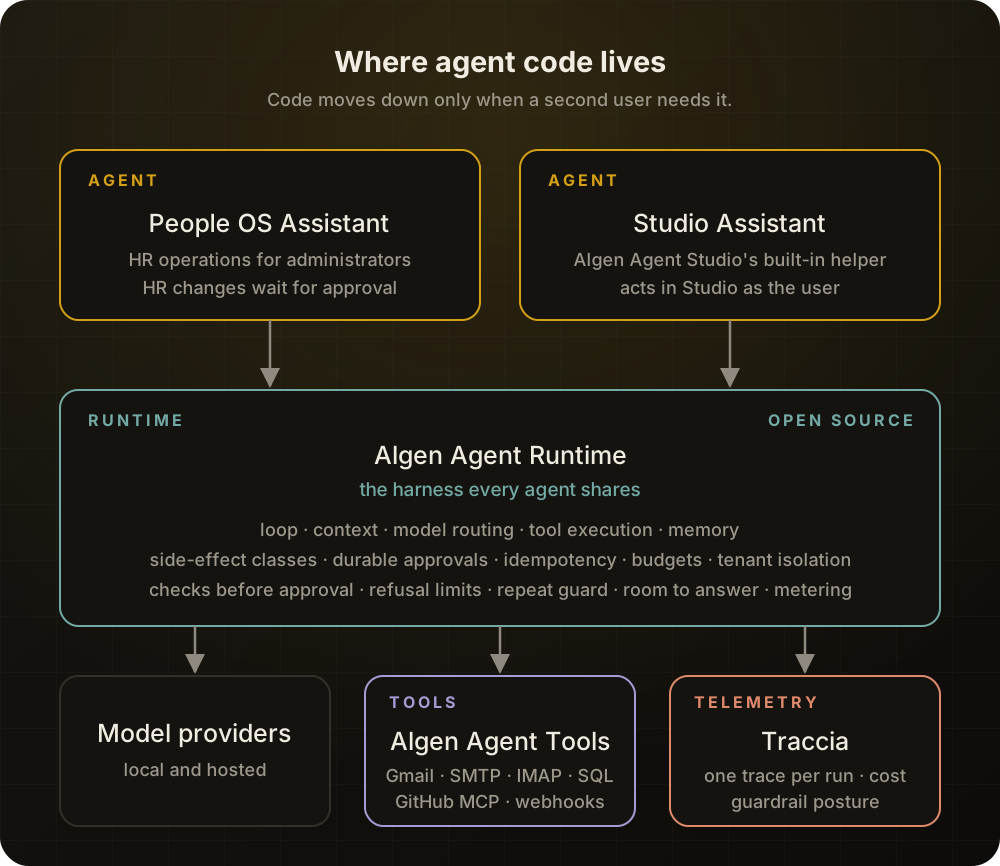
The runtime: the harness every agent shares
The industry increasingly calls the machinery around a model the harness, though people still draw its edges differently. It runs the loop, assembles the context, executes tools and decides when to stop. Coding agents made the term popular, but every production agent has one, whether its builders call it that or not.
Ours is Algen Agent Runtime, a typed, provider-neutral Python runtime released under Apache-2.0. It does the harness's job: the loop, context packing and compaction, skills loaded on demand, memory, retries and model routing. What sets it apart is that governance lives inside that loop rather than in the prompt.
An agent that changes records or sends messages needs more than an instruction telling it to be careful.
What that means in practice:
- Every tool declares its side effect: read-only, write, external or destructive. Approval rules, retries and caching follow from that declaration, not from what the model says it intends.
- Side effects are idempotent and recorded. Each side-effecting call carries a key unique to its run and call. The approval and a reservation are saved before the tool runs. If the process dies mid-call, the call is marked indeterminate and is never silently retried. An operator settles it through an audited reconciliation API: marks it completed or failed, asks the tool's own system whether it took effect, or explicitly runs its compensation. A run can be set to pause until that happens.
- Paused runs are durable. A run waiting for a human approval survives a restart and resumes on any worker, and versioning stops two workers from both continuing it.
- Models are routed by capability. A model that can't do tool calls, structured output or images is excluded before routing, so an agent can't silently ask for something its model doesn't support. Switching providers is a configuration change.
- Budgets end runs. Steps, tokens and cost are bounded per run.
- Retrieval is filtered by tenant before ranking, and retrieved content is marked as untrusted data.
- It is testable offline. A deterministic mock provider runs the whole loop with no API key or network.
Every model call re-sends the whole conversation, so a model that flounders is a model that spends. The runtime also guards against that, for every agent:
- Checks before asking. A call that would be refused, such as a change with a missing field, goes back to the model to fix before any human is asked to approve it.
- Refusal limits. A model that keeps sending a call that keeps being refused is told to stop and explain, instead of paying to try again.
- A repeat guard. An identical lookup with nothing changed since doesn't run again; the model is reminded that the answer is already in front of it.
- Room to answer. As a run nears its step or token limit, the model is told to wrap up and report what's done and what isn't, instead of being cut off without an answer.
- Every call counted. Model calls the runtime makes on its own, for retries and history compaction, are metered like the agent's own, so a product can charge or cap them.
The runtime also works with loops it didn't write. Agents built with LangGraph, the OpenAI Agents SDK, AutoGen or CrewAI can run inside the same envelope of tenant, timeout and trace. The guarantees matter more than whose loop is inside them.
Just as important is what the runtime refuses to own. It has no HR and no idea what Studio is. Domain behaviour arrives as configuration, tools and plugins.
Not everything in the runtime passes this test yet. It also ships retrieval and analytics workflows, which plenty of agents never use. They are the next candidates to move out, the way the connectors did.
We're also honest about where it stands: at the time of writing, 0.1.0a17 is a pre-release, single-node foundation. It now ships OIDC authentication and an audited way to settle uncertain tool calls, but recovery drills against live stores, sandboxing for local tools and signed policies are still open.
How code moves into the runtime
The runtime didn't start with all of this. When we planned the Studio Assistant, we listed what it needed that the runtime couldn't yet do. Some gaps were plainly general and were closed in the runtime straight away: tool errors returned to the model so it can correct itself, a turn that carries on after the user declines an approval, parallel tool calls, and tool results kept in conversation memory.
The guards against wasted calls took a longer route. They were born in a small library inside Studio, written for the Studio Assistant after costly turns in production. For a while that library looked like a layer of its own, between the runtime and the agents. Then the People OS Assistant needed the same things: an HR change with a missing field shouldn't reach the approvals queue, and an assistant near its limit should still report back. A second user is the signal, so the general parts moved into the runtime. What only Studio needs (editing a project's files, undo, steering the Studio Assistant mid-task) stayed in Studio. The middle layer dissolved, and nothing was lost.
The rule works the other way too. When a fix only makes sense for one product, it stays in that product. Early on, the Studio Assistant waited for a long build by asking the model to check again and again. Every check re-sent the whole conversation, and one turn used up an organization's credits. A budget can stop a run like that, but the real fix belonged to the Studio Assistant: one tool now starts the build, follows it and reports back. Only Studio has builds, so only Studio needed that tool.
Beside the runtime: Algen Agent Tools
The runtime used to ship a few connectors in its core: an SMTP sender, a Gmail inbox client, a generic database tool. They worked, but they failed the test. Gmail's API and a MySQL driver change on their own schedules, need their own owners and security reviews, and have nothing to do with how a run is checkpointed. So they moved into Algen Agent Tools, a separate Apache-2.0 package.
| Tier | Package | Contains |
|---|---|---|
| Core | algen-agent-runtime | Tool contracts, side-effect presets, plugins, MCP and HTTP adapters |
| Connectors | algen-agent-tools | PostgreSQL, MySQL, SQLite, SMTP, Gmail, IMAP, Outlook, Telegram, Discord, GitHub, documents, webhooks |
| Domain packs | Each product's own package | HR, hiring, text-to-SQL and other product-specific tools |
Every connector follows the same rules:
- Narrow, typed actions, never a passthrough. A database connector offers
list_tables,describe_tableand the typed queries you register, not free-form SQL. A webhook connector offers one action per configured target, not arbitrary HTTP. - Side effects come from the runtime's presets. Anything that writes, sends or deletes carries an idempotency key and is tried exactly once.
- The deployment decides, not the model. When email left the runtime, the sender address moved from the model's arguments to the deployment's configuration.
- Secrets are
env://references, resolved when a client first opens and never returned in a result or an error. - Every connector has an in-memory fake for offline tests and passes the same contract test.
Getting into the package is deliberately hard. A new connector needs at least two projects that use it, no domain logic, a named owner and a recorded security review. And if a well-maintained MCP server already exists, we don't write a client at all. We ship a governance overlay: a reviewed mapping that declares each remote tool's side effect, permission, approval rule and input schema. Undeclared tools are never exposed, and a tool whose schema changes upstream is refused until someone reviews it again. GitHub arrives this way.
A connector is code that talks to someone else's system with your credentials. It deserves the same review as the runtime, and a shorter list of things it's allowed to do.
The agents, where the domain lives
Everything above exists so that the agents can be mostly about their job.
The People OS Assistant operates Algen People OS for HR administrators: people, hiring, onboarding, leave, payroll, appraisals, offboarding and HR email. It runs on the runtime, guards included. Its tools act with the signed-in administrator's own permissions, so the People OS Assistant can do what the administrator can, and nothing more. Reads run at once; anything that updates a record or sends an email waits for an HR approval in People OS itself, so the assistant can't skip that step. Its HR mail goes through connectors from Algen Agent Tools, while its HR tools are its own domain pack, because "run payroll" belongs to no other product. Its engineering effort goes where it should: into instructions that describe a pending change honestly, and into tools that explain why People OS rejected a request.
The Studio Assistant is the panel docked beside every project in Algen Agent Studio. It answers questions about a project and, when asked, does the work: editing the draft, changing configuration, running checks, evaluations and builds, and wiring connectors from the Tools catalog into the user's agents. It also runs on the runtime. Everything it does in Studio goes through the same paths the user's own clicks do, so roles, organization boundaries, audit and credits apply unchanged. There is no back door, and some things, such as handling secret values, it won't do however it's asked.
The Studio Assistant's behaviour is checked against the real model, not only unit tests. Each evaluation case drives the Studio Assistant the way a user would and checks what it did, what it asked before doing, what it spent and what the project looked like afterwards. A change to an instruction is judged by all of those together, not by whether the answer reads well.
Watching all of it: Traccia
Separating code makes it easier to build and harder to watch. One turn passes through the agent's instructions, the runtime's policies and router, a model, and a connector or two. When a user says "that was slow" or "that cost too much", we need to see the whole turn, not five logs.
That is the job of Traccia, our control plane for AI agents in production, and the telemetry backend for both agents. The runtime stays vendor-neutral and emits standard OpenTelemetry; with Traccia switched on, what arrives is more than raw spans:
- One run, one trace. The planning, context, policy, model, tool and memory steps of a run sit under one root. A run that pauses for approval and resumes later continues the trace it started.
- Who, what and how much. Agent identity, session, tenant and token usage are stamped by the runtime itself, so Traccia can roll up time, tokens and cost per agent, per conversation and per tenant.
- Guardrail posture. Every guardrail that runs is recorded with whether it fired, so we can see which ran, which triggered, and where coverage is missing.
- Feedback in context. User feedback is recorded inside the trace of the answer it's about, so a complaint like "too costly" leads straight to the step that spent the tokens.
Privacy is a setting, not an afterthought. Prompts, tool inputs and outputs, and chat text are excluded from traces unless a deployment explicitly turns them on. Both agents keep them off in production; HR data never leaves the People OS Assistant in a trace, only the shape, timing and cost of each run.
The rule, in one table
| Where | What belongs there | Changes | Licence |
|---|---|---|---|
| Runtime | What every agent needs: the loop and the guarantees around every run | Slowly, behind versioned contracts | Apache-2.0 |
| Tools | How agents talk to a vendor, once two projects need it | When the vendor changes | Apache-2.0 |
| Agent | What only this job needs | Weekly, sometimes daily | Proprietary |
Rule of thumb: Move code down only when a second user needs it, and never copy a lower layer's job back up into an agent. If you find yourself inventing a layer in between, check whether its parts belong above or below it.
Fix a domain problem in the runtime and every agent inherits a special case. Copy runtime safety into an agent and the copies drift apart.
Five things worth copying
- Ask "who else would need this?" of every piece of agent code, and move it down only when the answer is a real second user.
- Put safety in the loop, not the prompt. Declare side effects, save approvals before a tool runs, key every side effect, and treat an interrupted one as unknown, never as safe to retry.
- Keep vendor clients out of your core. Give agents narrow, typed actions, let the deployment choose senders and hosts, and prefer a reviewed overlay on a good MCP server to a client of your own.
- Stop the model wasting calls. Make tools do whole tasks, check a call before anyone is asked to approve it, and leave the model room to answer. A model that polls is a model that spends.
- Trace every run end to end, keep content out of traces by default, and judge an agent change by behaviour, calls and cost together.